This report documents a malvertising campaign exploiting WebAssembly (WASM) to conduct attribution fraud across mobile advertising ecosystems. The campaign simulates legitimate user interactions, clicks and impressions, to manipulate attribution platforms including AppsFlyer and Adjust, diverting ad revenue from legitimate publishers and developers.
Figure 1. Examples of legitimate ads served alongside the fraudulent activity.
WebAssembly’s involvement in malvertising is uncommon. In early 2022, GeoEdge documented its use in redirect attacks in How Cybercriminals Exploit WASM Security Vulnerabilities. This campaign is more sophisticated: WASM is deployed here specifically for its execution speed and resistance to static analysis, enabling the fraud logic to run undetected in live app sessions.
The campaign employs shadow DOM manipulation, custom HTML elements, cloaked server responses, server-side fingerprinting, and a post-execution DOM clean-up routine, all designed to ensure fraud fires only against real users while appearing clean to automated scanners.
Figure 2. Attack distribution by Country.
This report details the campaign’s full technical flow, presents the Indicators of Compromise (IoCs) and Tactics, Techniques, and Procedures (TTPs), and includes a walkthrough of the WebAssembly debugging process.
Understanding the Terminology
Click Fraud refers to the manipulation of online advertisements to generate fake clicks, exploiting the pay-per-click (PPC) model to extract illegitimate revenue. In certain ad environments, click fraud can escalate into auto-redirect attacks, pushing users to malicious destinations without their consent.
Impression Fraud involves generating fake ad views with no genuine user engagement, artificially inflating impression counts to exploit the CPM model, which compensates based on views rather than clicks.
WebAssembly (WASM) is a binary instruction format that allows code written in languages such as C, C++, and Rust to execute in the browser at near-native speed. It is supported across all major browsers and in many cases is faster than JavaScript. In the context of malvertising, WASM is attractive to attackers for two reasons: it is significantly harder for security scanners to analyze than JavaScript, and its binary format complicates debugging, making malicious logic easier to conceal.
Business Impact
Attribution platforms like AppsFlyer and Adjust sit at the center of how ad revenue gets distributed: they determine which ad or publisher receives credit and payment for a user action such as a click or app install. This campaign exploits that mechanism directly. By generating fake interactions that attribution platforms log as real, the attacker gets credited as a legitimate affiliate or publisher and paid accordingly, while ad networks and advertisers pay for performance that was never delivered.
The direct financial victim is the advertiser, but app developers face indirect consequences that can be equally damaging. When click fraud rates inflate across a supply partner’s traffic, advertisers and DSPs respond by pulling budgets, lowering CPM/CPI rates, or withholding payouts, and developers who have nothing to do with the fraud can get flagged in the process.
The exposure is compounded when a fraudster spoofs a legitimate app’s ID. Attribution systems may log fraudulent installs under the real app, and that developer becomes the apparent source of the fraud, facing audits, reduced demand, or suspension from ad networks they depend on for monetization.
The Campaign’s Flow
Brief Overview
At its core, the attack embeds malicious scripts inside ad tags that appear legitimate to standard scanners. When a real user is detected via server-side fingerprinting, the fraud logic activates: obfuscated code fetches fraudulent click and impression URLs from the attacker’s server, and WebAssembly executes the fraud by dynamically setting iframe origins to those URLs. The page then simulates ad views and clicks without any visible user interaction. Once complete, the DOM elements used to generate the fake events are deleted, leaving no trace. Attribution platforms receive these interactions and log them as real.
A key characteristic of this campaign is that the fraud does not target only the promoted app. While a legitimate ad runs in the foreground, one or more fraudulent impression and click events fire simultaneously in the background, each attributed to apps entirely unrelated to the promoted ad and to each other.
Figure 3. Campaign flow diagram: the promoted ad runs a legitimate click path while malicious code fires simultaneous impression and click fraud events against unrelated apps in the background.
For example, Ad Promoting Heetch:
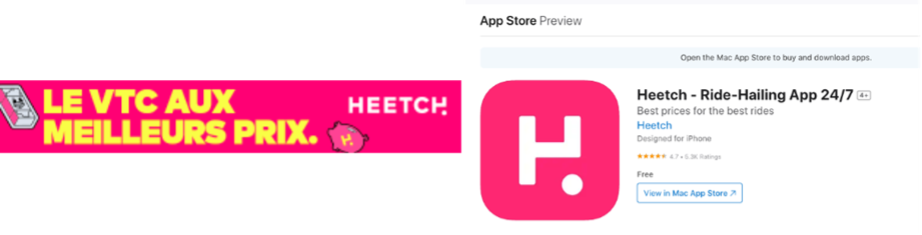
Figure 4. Left: Heetch banner ad as served to the user.
Right: Heetch App Store listing (promoted app).
Have Click and Impression Fraud to the following apps:
Figure 5. Left: Bolt App Store listing. Right: Turo App Store listing.
Step-by-Step Breakdown
Figure 6. Full attack flow from ad request through malicious script retrieval, WebAssembly execution, and final delivery of fraudulent click/impression URLs to AppsFlyer and Adjust
Step 1: Banner Code
The ad tag loads a dummy image and a click URL. Inside the ad tag, a script tag is embedded, which sends a network request to the attackers’ private domain.
Figure 7. Example of the ad tag.
Step 2: Cloaked Content via Script
A network request is made to retrieve the script tag, structured as follows:
The attacker’s server uses server-side fingerprinting to return different content depending on the user. If the user is filtered out, the returned script contains obfuscated code with a second loader to make it appear as a legitimate request.
Figure 8. Obfuscated script returned when the user is filtered out.
If the fraud attack is initiated, the returned script contains additional content, unpacked and executed using the eval and atob functions. This creates two environment variables: one containing a list of encoded URLs, the other holding a number in hexadecimal format.
Figure 9. Obfuscated script returned when the fraud attack is initiated.
Figure 10. Example of environment variables, encoded URL list and hexadecimal value.
Step 3: Tricky Class
The malicious code creates a new HTMLElement named Tricky, defined and instantiated under the name my-tricky. The element is declared as a Shadow DOM: a self-contained web component whose internal structure is hidden and isolated from the rest of the page. The Shadow DOM conceals the iframes created inside it from standard inspection.
Figure 11. The my-tricky element without Shadow DOM
Figure 12. The my-tricky element with Shadow DOM
The Tricky element makes fetch requests for each of the encoded URLs stored in the environment variable from Step 2.
Example of decoded URL: https://{domain}/redirect?{query_params}&type=json
The redirect endpoint may also appear in a versioned form such as redirectV2.
Figure 13. The Tricky class definition and my-tricky HTMLElement as they appear in the ad tag.
Step 4: Click Fraud URL
The fetch requests return JSON files containing embedded URLs. Server-side fingerprinting is applied again here: the response is cloaked with a google.com URL when the user is filtered out, and switches to the click-fraud domain go.g2app.net when the attack is initiated.
Example of a cloaked JSON response: {o_id:0, url: “https://google.com”}
For each response URL, a new iframe is dynamically rendered while evaluating another encoded script. At this stage, no network request is made for the URL, it is only embedded under the link attribute. This iframe will be referred to as a dynamic iframe in the steps that follow.
Figure 14. The method used to dynamically render the iframe with the encoded script.
Step 6: WebAssembly Declarations
The dynamically loaded script acts as a WebAssembly initiator, containing the definitions of JavaScript functions that will be imported from within it. Several of these functions come from the ASDOM library, built to facilitate communication between the DOM and WebAssembly.
Figure 15. Exported and imported functions ASDOM
Figure 16. WebAssembly initiator functions, including the .wasm binary code
Step 7: Fraud Initiator
The WebAssembly code sets the dynamic iframe’s origin to the URL returned from the JSON request in Step 4. When the server initiates the fraud, go.g2app.net/click? returns a 302 redirect, resetting the iframe’s origin to a fake ad click or impression URL.
When the user is filtered out, the iframe attempts to load google.com instead, producing the following error:
Figure 17. Browser error: google.com refuses to be loaded in the frame
The error occurs because X-Frame-Options is an HTTP header that controls whether a browser may render a page inside a frame or iframe. When set to sameorigin, content can only be displayed in a frame if the request originates from the same domain. This is a standard clickjacking protection, and in this context, it serves as a signal that the user has been filtered out rather than targeted.
Step 8: Clean-Up
After the fraud is executed, the attacker clears the dynamic iframes created inside the my-tricky element by setting the Shadow DOM’s innerHTML to an empty string via setTimeout.
Figure 18. The setTimeout function used to wipe the Shadow DOM contents after execution.
Figure 19. The my-tricky element after clean-up.
Debugging the WebAssembly code
To debug the .wasm code, we replicated the dynamic iframe’s content by constructing a frame with a ‘body’ element containing a ‘link’ attribute and a ‘script’ element with the decoded WebAssembly declarations, using ‘example.com’ as the URL. ‘.wasm’ refers to files with the WebAssembly binary format.
A debugger was set on the JavaScript function betaTeta, which serves as the entry point of the WebAssembly code, and its execution was traced into the ‘.wasm’ code.
Figure 20. Main function of the WebAssembly code as seen in the debugger.
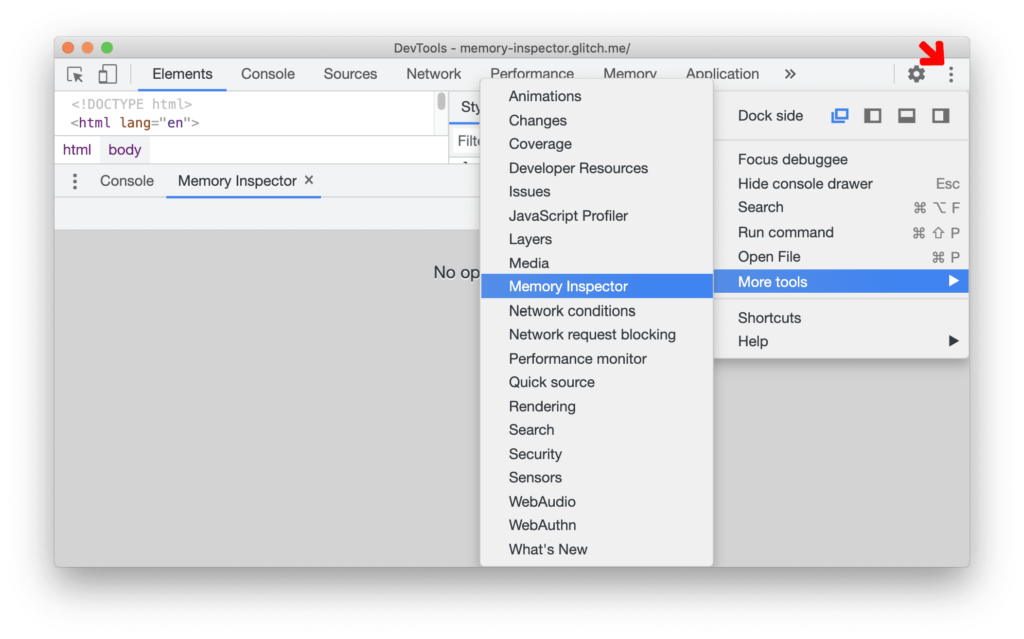
The Memory Inspector was accessed through Chrome DevTools.
Figure 21. Memory Inspector accessed via Chrome DevTools. Sourced from developer.chrome.com.
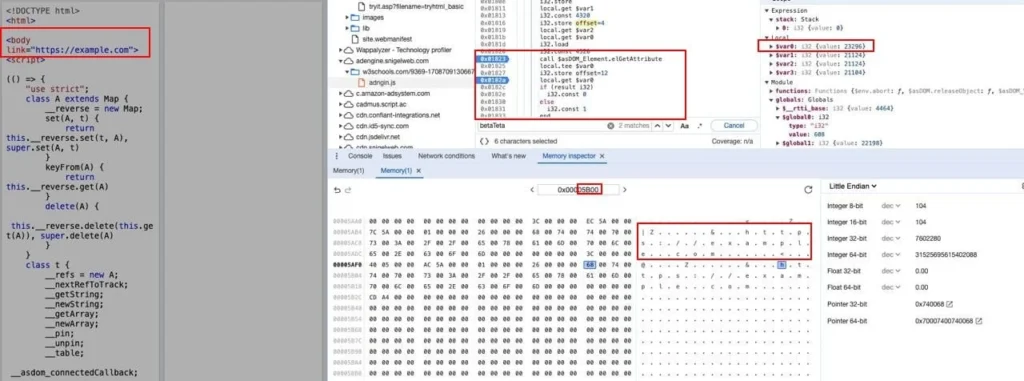
Figure 22. Example of data stored in memory during execution.
The same data can be observed within the ‘.wasm’ code’s data segments, likely part of a module defining error messages.
Figure 23. Corresponding data segments in the .wasm code.
Due to the complexity of the code (4,156 lines), the following focuses on two sections directly responsible for executing the click fraud.
The first step in using the URL is to store it in memory. The highlighted code in the screenshot below corresponds to a call to getAttribute, one of the imported JavaScript functions. It checks for the existence of the link attribute and, if found, stores its content in memory at $var, which holds the value 23,296 in decimal, or 0x5B00 in hexadecimal.
Figure 24. Frame declaration with embedded link URL alongside the .wasm code and memory at location 0x5B00.
After storing the URL in memory, the code calls setHref, another imported JavaScript function, to set the frame’s origin to example.com.
Figure 25. The setHref call in the .wasm code.
Figure 26. The frame after execution: Location set to https://example.com. Neither the function name nor its content appears suspicious without context.
In the real attack, the fraud URL fires in the background with no visible effect on the user. In some environments, however, this behavior may escalate into an auto-redirect attack.
The following techniques were employed by the attacker:
Cloaked Content. Server responses are conditionally modified based on the requester’s profile, returning legitimate-looking content to scanners while delivering malicious payloads to real users.
JSON Request for URL. Fraud destination URLs are fetched dynamically via JSON responses, allowing the attacker to change targets without modifying the ad tag.
Rendering WebAssembly Inside an iFrame. Executing the fraud logic inside an iframe isolates it from the main page context, making it harder to detect and debug.
Injecting Malicious Script via HTMLElement. Initiating execution through a custom HTMLElement adds an additional layer of obfuscation to the script’s entry point.
Shadow DOM and Hiding Traces. Malicious iframes are encapsulated within a Shadow DOM element. After execution, the contents are wiped to remove evidence.
Splitting the Script. Dividing the malicious logic between JavaScript and WebAssembly increases analysis complexity. Meaningless names in the exported JavaScript functions further obscure intent.
Server-Side Fingerprinting. Targeting is applied at the server level, ensuring the fraud activates only against real users matching a specific profile.
Obfuscation and Encoding. The malicious script is obfuscated and encoded to resist detection and static analysis by security solutions.
Malicious Actor-Owned Domains. Attacker-controlled infrastructure allows the campaign to be adapted or redirected as needed without reliance on third-party services.
Moriya is a Security Researcher at GeoEdge, covering cybersecurity, malware, and malvertising threats across the digital advertising supply chain. You can find Moriya on LinkedIn to connect on all things AdTech security.
Malvertising, the practice of sprinkling malicious code into legitimate-looking ads is growing more sophisticated. GeoEdge’s holistic ad quality solution has you covered.